From error to pull request with Linear and Claude
Guidely turns a new error into a Linear ticket. Claude reads the stack trace, replay and suspect commits over MCP and opens the fix for review.
Gurp Parmar5 min read
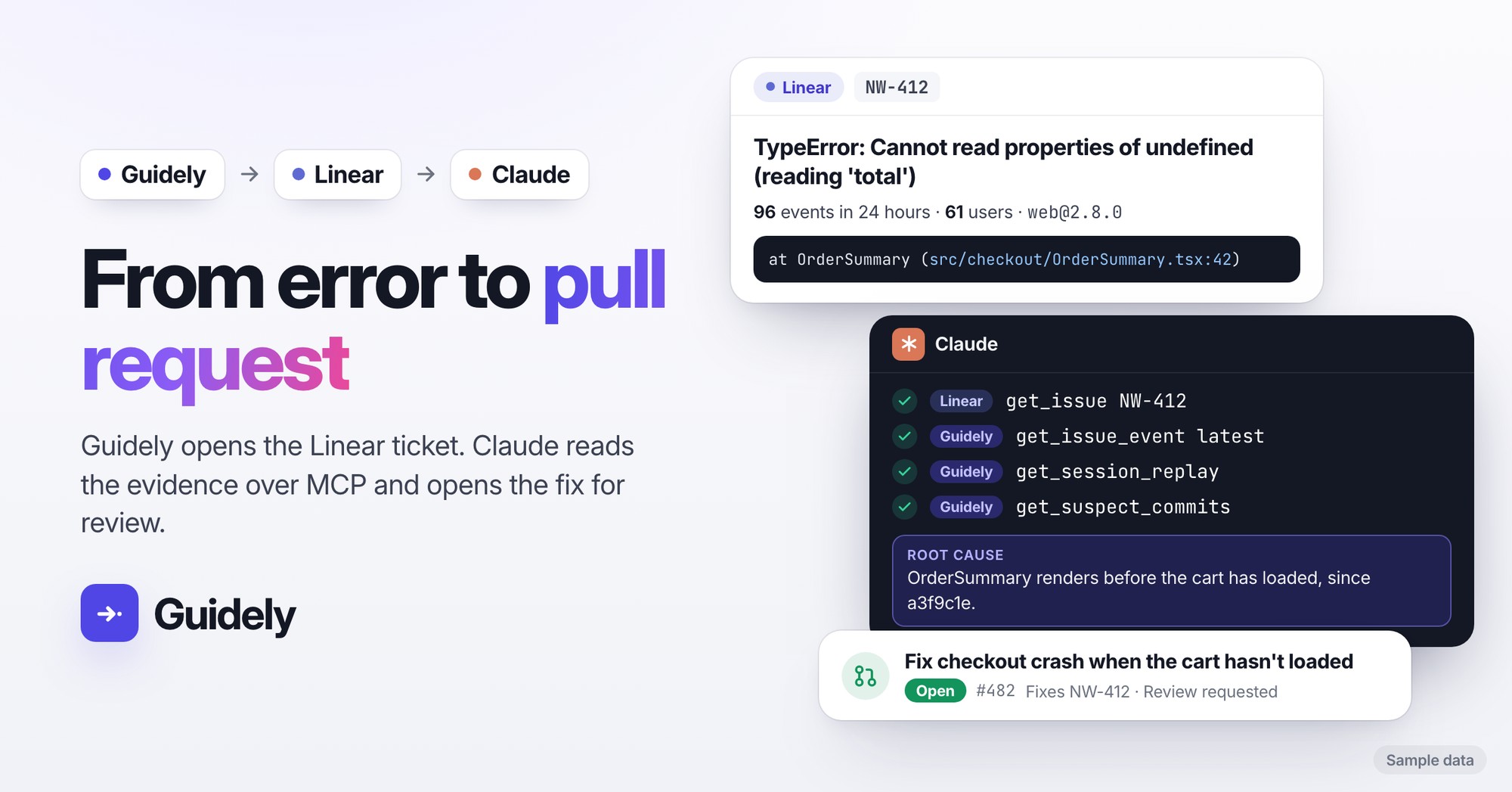
Most teams fix errors in a way that makes them wait. An alert fires, somebody decides whether it matters, somebody files a ticket, and an engineer opens it hours later and starts again from the beginning: which user, which page, which release, can I make it happen again? If a customer reported it, support goes back to them for screenshots.
Teams using Guidely are cutting most of that out. They connect three tools: Guidely catches the error, Linear holds the ticket, and Claude does the first pass at the fix, reading everything Guidely knows about the error through our MCP server. The engineer's job becomes reviewing a pull request, not reconstructing what happened.
The loop
Guidely catches the error and an alert rule (new issue, regression or spike) opens a Linear ticket for it. One ticket per issue, so a noisy error doesn't open fifty.
Claude picks up the ticket through Linear's MCP server, and follows the link in it into Guidely through Guidely's MCP server.
Claude reads the evidence: the source-mapped stack trace, breadcrumbs, the recording of the user who hit it, the commits that probably caused it, and your backend's trace and logs if you've connected them.
Claude writes the fix in your repository, with a test, and opens a pull request for someone on your team to review.
Claude closes the loop: it marks the error resolved in the next release in Guidely and comments on the Linear ticket with the pull request. If the error comes back after that release, Guidely flags it as a regression, and an alert rule that covers regressions opens a new ticket once the old one is closed.
A ticket that's ready to work on
The Linear ticket Guidely opens isn't just a title and a link. It has:
The error message, how many times it has happened and how many users it hit in the last 24 hours
First and last seen, the release, the URL and the browser of the latest occurrence
The stack trace, source-mapped back to your own files and lines
A link to the error in Guidely, and a link to the recording that starts a few seconds before the error
That's enough for a person to start. For Claude, it's the starting point for everything else.
What Claude can read in Guidely
Connected to Guidely's MCP server, Claude works with the same data you see in the dashboard:
The full event (
get_issue_event): the exception chain with source-mapped frames, code around each frame, local variables, breadcrumbs, tags and the release.How widespread it is (
get_issue_tags,list_issue_events): which browsers, releases and pages, and whether it's one customer or everyone.What the user did (
get_session_replay): the pages, clicks and errors leading up to it, as a timeline, with a link to watch the recording.Where it came from (
get_suspect_commits): the commits most likely to have caused it, when your GitHub repository is linked.The backend side (
get_trace,query_backend_logs): the trace across browser and server, and the log lines from your own Loki, if you've connected your observability stack.Guidely's own analysis (
get_issue_ai_analysis): a summary, root cause and suggested fix, when AI analysis is on for the project.
Then it can act on what it found: resolve_issue with inNextRelease, assign_issue, set_issue_priority and add_issue_comment, so the issue in Guidely says what happened and where the fix is.
Not just errors: problems your users report
The same loop works when a user tells you something is broken instead of the SDK. From a Scout conversation, a complaint or a bug report in Guidely, Create ticket sends it to Linear with the conversation and the recordings you picked as the cause. Claude reads the conversation, finds the session where it went wrong, and works out whether it's a bug to fix, a missing help article or a confusing screen.
It can draft the help article (saved as a draft for your team to review) or the fix, and summarise for your support team what happened and what to tell the customer. Guidely deliberately doesn't let an assistant reply to your users, so the reply still comes from a person. It just comes much sooner, with the answer already worked out.
Why it's fast
No copy and paste. The ticket carries the evidence, and Claude fetches the rest itself. Nobody pastes stack traces into a chat.
No duplicate work. Guidely opens one ticket per issue and checks whether it's still open in Linear before opening another, so the same error never ends up in two tickets.
No reproducing from scratch. The recording shows what the user did, and suspect commits point at the change that broke it.
A person still decides. Claude opens a pull request; your team reviews and merges it.
Safe by design
Guidely's MCP server acts as you. Claude sees the workspaces and projects you can see, with your role and permissions, and changes show up in Guidely as yours in the audit log.
Connections are read only by default. Resolving, assigning and commenting need a connection that may make changes, and Claude asks you before it resolves, reassigns or reprioritises an issue.
Assistants never get request headers, bodies or cookies, your end users' email or IP addresses, or values that look like credentials in contexts, local variables or span data.
Assistants can't delete anything, reply to your users or change settings, members or keys.
In HIPAA mode workspaces, tools that could return end-user data, including errors and replays, are switched off for assistants.
Set it up
In Guidely, open workspace Settings → Issue trackers and connect Linear. Then, on Errors → Alerts, add a Ticket action to the issue alerts you want tickets for.
Connect Claude to Guidely and to Linear. In Claude (web or desktop), add both as connectors. In Claude Code, run:
claude mcp add --transport http guidely https://guidelytech.com/api/mcp
claude mcp add --transport http linear https://mcp.linear.app/mcp
then
/mcpto sign in to each. Choose Read and make changes when connecting Guidely if you want Claude to resolve and comment.Link your GitHub repository in Guidely so Claude gets suspect commits, and upload source maps so stack traces point at your own code.
Ask Claude, from your repository:
Take the newest Linear issue opened by a Guidely alert rule. Open the Guidely error it links to, read the latest event, the recording and the suspect commits, and fix it here with a test. Open a pull request, then resolve the error in Guidely in the next release and comment on the Linear issue with the PR.
Run that prompt on a schedule with Claude Code and new tickets get a first pass as they arrive.
The AI assistants docs list every tool and what it can and can't see, and the alerts docs cover rules and ticket actions.