Deploy any time. Release when you’re ready.
Feature flags split shipping code from releasing features. Here’s how Guidely’s flags work, from rollouts and kill switches to experiments measured on the events you already track, all in the SDK you’ve already installed.
Gurp Parmar5 min read
Every team knows the feeling. The release is merged, the deploy is going out, and everyone is watching the error dashboard and hoping.
The trouble is that one deploy does two jobs. It ships the code, and it releases the feature to every user at the same moment. If something goes wrong, the only way back is another deploy.
Feature flags separate those two jobs. You can merge and deploy whenever the code is ready, then decide who sees the feature, and when, from a dashboard. If it misbehaves, you turn it off in seconds without redeploying.
Guidely now has feature flags built in. Here’s how they work and why it helps to have them in the same SDK as everything else.
Release in steps
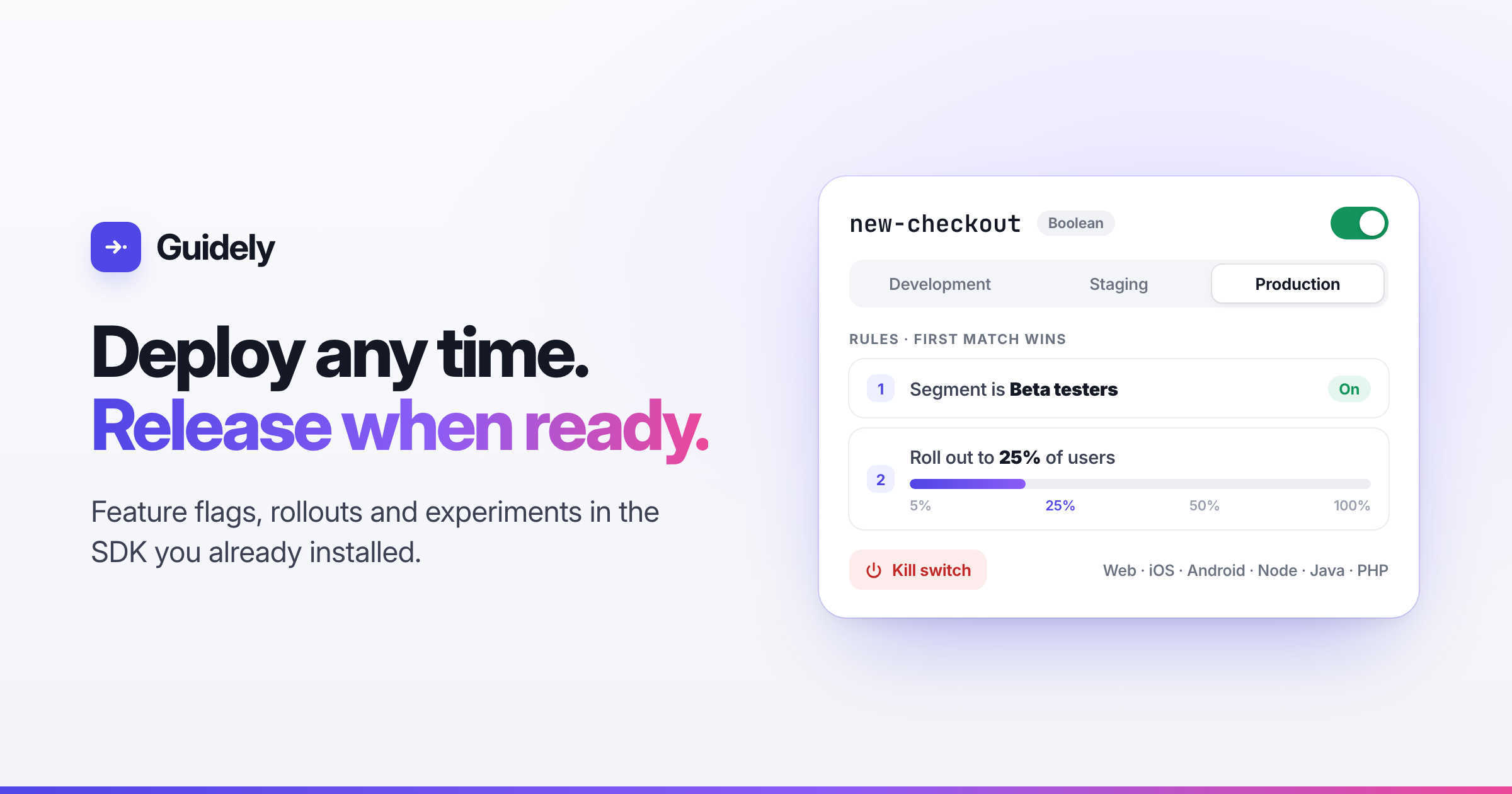
A flag holds a set of rules, checked in order, and the first one that matches decides what the user gets. A typical launch looks like this:
Your team first. A rule that turns the feature on for your own workspace.
Beta testers next. A segment of customers who asked for early access.
Then a percentage. 5% of users, then 25%, then 50%. You can schedule the ramp ahead of time so it moves up on its own.
Then everyone. Once you’re confident, remove the rules and leave the flag on.
Each environment (development, staging, production) has its own switch and rules, so you can test the full rollout in staging before production changes.
Rules can target almost anything you know about a user, including plan, country, account, app version, signup date or a segment you’ve built. Flags can also depend on other flags, so a sub-feature only turns on when its parent is on.
A kill switch that works instantly
When something goes wrong, turning a flag off takes effect right away. Even when production changes need approval, switching a flag off never waits for review, because a kill switch that needs sign-off isn’t much use.
SDKs evaluate flags locally from one cached payload. Your app doesn’t make a network call every time it checks a flag. When you change something, the update streams to connected apps within seconds. If our API can’t be reached, apps keep using the last payload they received.
The same answer on every platform
This is harder than it sounds. A user opens your web app, your iOS app and your API in the same afternoon. If each platform’s SDK evaluates rules slightly differently, the same person might get the new checkout on their phone and the old one in the browser.
Guidely’s flag SDKs for React, Next.js, Svelte, React Native, iOS, Android, Node, Java and PHP all follow one written spec and are tested against the same set of shared test cases. Rollouts bucket users on the same ID everywhere, so a user who lands in the first 25% is in it on every platform.
If you already use Guidely, flags come with the SDK you’ve installed:
if (guidely.isFeatureEnabled("new-checkout")) {
  showNewCheckout();
}
On the server, it’s one client per process:
const flags = createFlagsClient({ sdkKey: process.env.GUIDELY_PROJECT_ID });
flags.forUser({ id: user.id, plan: user.plan }).isEnabled("new-checkout");
Experiments measured on events you already track
A flag can also run an A/B test. Split users across variations, pick a goal, and Guidely records who saw what.
Because flags share an SDK with your analytics, you don’t have to wire anything up between tools. The goal can be any event you already track, such as checkout_completed, a page view or a signup. Exposures are recorded automatically with each session. Results show the uplift for each variation, the chance each one wins, and a check that warns you when traffic isn’t splitting the way it should.
When you stop an experiment and pick a winner, the winner rolls out to everyone the rule targeted. You don’t need a cleanup ticket or a second deploy.
The parts other tools charge extra for
Most flag tools let you toggle a boolean on their free plan, then put what larger teams need behind a higher tier. Guidely includes all of it:
Approvals for production changes, with self-approval off by default
Revisions for every change, with a diff, an author and one-click revert
An audit log of every change, approval and kill switch
Stale-flag detection for temporary flags nobody checks any more, or that serve the same value to everyone
Code references, so you can see where each flag key appears in your codebase
Scheduled rules and ramps, holdouts and sticky bucketing
Signed webhooks when a flag changes or an experiment stops
None of this depends on your plan. Checking a flag isn’t billed either, because evaluation happens inside your app. The only thing that counts towards usage is experiment exposures, which are ordinary analytics events.
Safe to put in a browser
Anything sent to a browser can be read, so flags were built with that in mind:
Confidential targeting: values such as email lists are hashed before they reach the browser.
Server-only flags are never sent to public keys.
Remote evaluation lets browsers and apps send attributes and get back values without ever seeing your rules.
Encrypted payloads are available for public keys.
More than on and off
Flags can return strings, numbers or JSON as well as true or false. That makes them work as remote config too: a pricing-page headline, a rate limit or a list of enabled payment methods, all changeable without a deploy. JSON values can be checked against a schema when you save them, so a typo can’t take down production.
For tests, you can pin flag values with an environment variable, a file or a Playwright init script, so CI runs the exact combination you want without touching the dashboard.
Moving from another tool
If your flags are in ConfigCat today, Feature flags → Import from ConfigCat copies your flags, targeting rules and segments across, with a preview before anything changes. One caveat: Guidely calculates percentage buckets differently from ConfigCat, so users in a percentage rollout may land in a different bucket after you switch. The importer warns you about this.
Ship without the nerves
The best releases are the ones nobody notices. The feature reaches a few people, then more, then everyone, and if something goes wrong, someone turns it off before most users ever see it.
Start free on Guidely. Flags come with the SDK, so you might already have them.